
Serato Remote Mini1.3 - App Store
You'll be able to see results in few seconds.
Publisher Description


The Serato Remote Mini is a special version of the Serato Remote, designed specifically for use with your iPhone or iPod touch. Designed to compliment an existing Scratch Live or Serato DJ setup, we took the best parts from the Serato Remote and stripped it back for better usability with the smaller screen of the iPhone and iPod touch. Now you can have the Serato Remote with you at all times, ready to whip out for a little extra control at your next party.
Serato Remote Mini will connect seamlessly to your Serato laptop software and work with all supported Scratch Live and Serato DJ hardware. Load tracks, instant double, set and trigger Cue Points, Loops and Samples and manipulate FX. Connect over USB for ultra low latency or wirelessly, freeing you to move around the stage.
We’ve designed the app with real world performance in mind:
• Plug & Play with easy set up
• Big easy to hit buttons that are quick to locate on the fly
• Control Cue Points, Samples and FX
• Perform Auto Loops and Loop Rolls
• Perform super fast Instant Doubles
• Roll FX Mode combines Loop Rolls with momentary FX
• Cue Point inherited from the Serato laptop software
• Virtual Decks, BPM and time information mirror the information on your laptop
• Scroll your library and load to deck.
• Control of your Scratch Live or Serato DJ Sample Player.
Similar to the Serato Remote for iPad, the Serato Remote Mini has library control, plus three performance tabs: PADS, SP6 & FX, all have been meticulously designed for the iPhone and iPod touch.
PADS
The PADS performance tab gives you control of 4 Cue Points per deck, with a pop out loops panel for controlling Auto Loops and Loop Rolls.
SP6
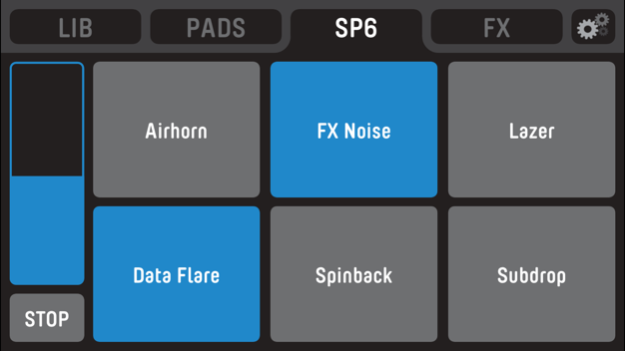
We've kept it simple and focused on performance, with a play button for each slot, plus a global volume control and stop button. Trigger those airhorns straight from your phone!
FX
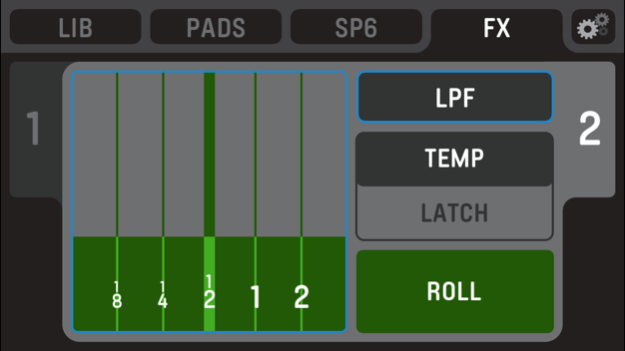
The FX performance tab gives you an easier and more creative way of controlling Scratch Live or Serato DJ FX
• Select your favorite FX and control them in latched or temp modes
• Trigger Loop Rolls and FX simultaneously using the FX Roll Mode.
LIBRARY CONTROL
Control your Serato software library on your laptop with the Library controls. Navigate your tracks and TAB to your crates, files or folders.
• Drag to Virtual Decks to load
• Perform super fast Instant Doubles by dragging from deck-to-deck
• Fast Scroll View with two-finger track load.
SET UP
Serato Remote Mini is designed to compliment an existing Scratch Live or Serato DJ setup, you will need:
Scratch Live or Serato DJ supported hardware.
• http://serato.com/scratchlive/hardware
• http://serato.com/dj/hardware
The latest release of Scratch Live 2.5+ or Serato DJ 1.2.1+
• http://serato.com/scratchlive/downloads
• http://serato.com/dj/downloads
• PLEASE NOTE SERATO REMOTE MINI REQUIRES SERATO SCRATCH LIVE OR SERATO DJ LAPTOP SOFTWARE AND SUPPORTED HARDWARE.
For more information on the setup
http://serato.com/remote/setup
For Technical Support with Serato Remote Mini
http://serato.com/remote/support
Check out the Serato Remote Mini pages for more details
http://serato.com/remote
Jul 30, 2017
Version 1.3
This app has been updated by Apple to display the Apple Watch app icon.
iOS 10.3 compatibility
About Serato Remote Mini
The company that develops Serato Remote Mini is Serato Limited. The latest version released by its developer is 1.3.
To install Serato Remote Mini on your iOS device, just click the green Continue To App button above to start the installation process. The app is listed on our website since 2017-07-30 and was downloaded 0 times. We have already checked if the download link is safe, however for your own protection we recommend that you scan the downloaded app with your antivirus. Your antivirus may detect the Serato Remote Mini as malware if the download link is broken.
How to install Serato Remote Mini on your iOS device:
- Click on the Continue To App button on our website. This will redirect you to the App Store.
- Once the Serato Remote Mini is shown in the iTunes listing of your iOS device, you can start its download and installation. Tap on the GET button to the right of the app to start downloading it.
- If you are not logged-in the iOS appstore app, you'll be prompted for your your Apple ID and/or password.
- After Serato Remote Mini is downloaded, you'll see an INSTALL button to the right. Tap on it to start the actual installation of the iOS app.
- Once installation is finished you can tap on the OPEN button to start it. Its icon will also be added to your device home screen.
Program Details
System requirements
Download information
Pricing
Version History
version 1.3
posted on 2017-07-30
Jul 30, 2017
Version 1.3
This app has been updated by Apple to display the Apple Watch app icon.
iOS 10.3 compatibility
version 1.3
posted on 2017-07-30
Jul 30, 2017 Version 1.3
This app has been updated by Apple to use the latest Apple signing certificate.
iOS 10.3 compatibility
version 1.3
posted on 2017-07-30
Jul 30, 2017 Version 1.3
iOS 10.3 compatibility
version 1.3
posted on 2017-07-30
Jul 30, 2017 Version 1.3
This app has been updated by Apple to display the Apple Watch app icon.
iOS 10.3 compatibility
version 1.0.1
posted on 2013-12-09
version 1.3
posted on 1970-01-01
2017年7月30日 Version 1.3
iOS 10.3 compatibility
Disclaimer
Official App Store Link
We do not host Serato Remote Mini on our servers. We did not scan it for viruses, adware, spyware or other type of malware. This app is hosted by Apple and passed their terms and conditions to be listed there. We recommend caution when installing it.
The App Store link for Serato Remote Mini is provided to you by apps112.com without any warranties, representations or guarantees of any kind, so access it at your own risk.
If you have questions regarding this particular app contact the publisher directly. For questions about the functionalities of apps112.com contact us.
